Security · Privacy
Is OwlAgent safe? What Owl can access, and what it never does
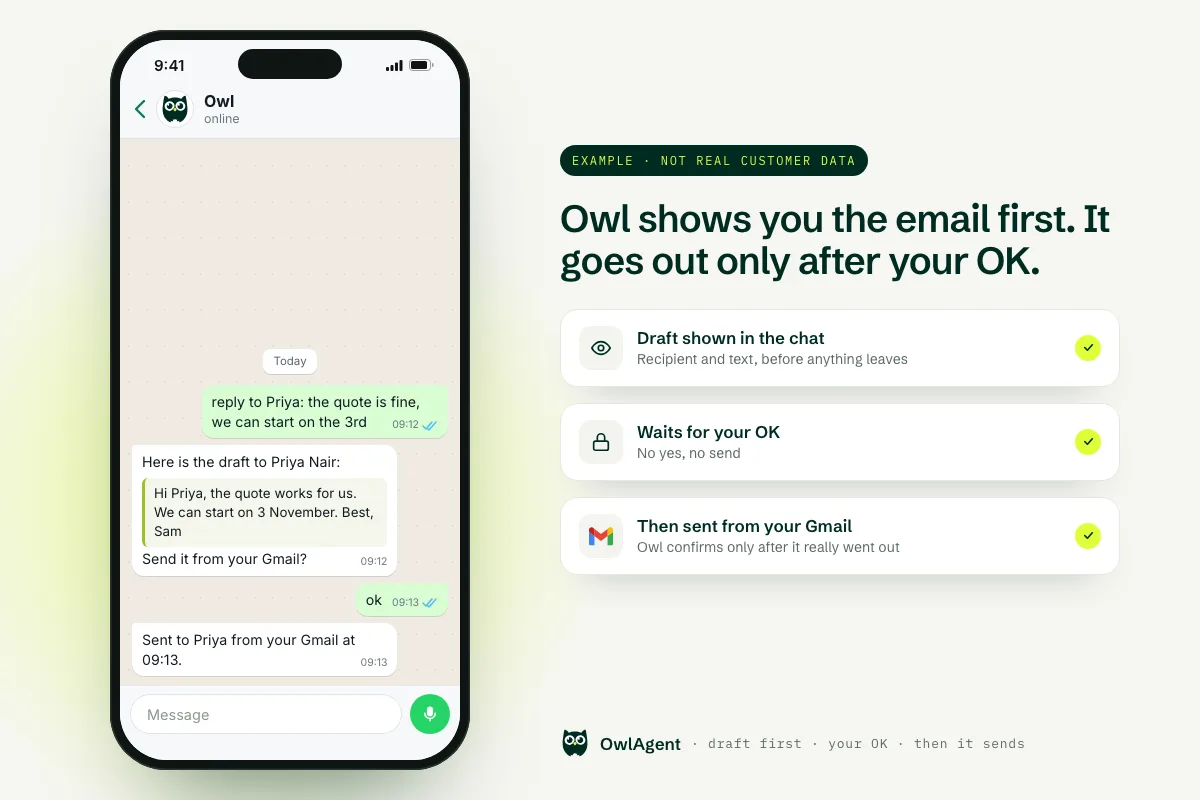
Yes, and here is exactly why. You connect Gmail, Google Calendar and your other tools on each provider’s own sign-in screen, so OwlAgent never sees your password. Owl reads, searches and drafts on its own, but it shows you an email or message and waits for your OK before it goes to anyone else, and email sends are also checked in code. It only sees the chat you have with it, never your other WhatsApp conversations. You can disconnect any tool in one click and ask us to delete your account. To be straight with you: we are a small team without SOC 2 or ISO 27001 yet, and your requests are processed by third-party AI models.
What Owl can access
Owl only works with what you give it. In practice that is four things:
- The messages you send to Owl on WhatsApp or Telegram, so it can understand and carry out your requests.
- The accounts you connect, such as Gmail, Google Calendar, Google Drive, Notion or your CRM. Owl reads emails, events, files or records only as needed for what you ask, including routines you set up yourself, like a morning brief. We do not bulk-copy your mailbox or your drive.
- A password or API key, only for the few tools that offer nothing else, such as an IMAP mailbox. These are encrypted at rest with AES-256-GCM, using a key kept outside the database.
- What Owl remembers about you: your time zone, your preferences, the people you work with. All of it is on the Memory page of your account, where you can edit or delete any item, or clear everything at once.
What Owl does before it acts
The line is simple: anything that stays with you, Owl just does. Anything that reaches another person, or can’t be undone, waits for your yes.
| What Owl does on its own | What needs your OK | What Owl never does |
|---|---|---|
| Read, search and summarize your email, calendar and files | Send an email or a message to someone else | Read your other WhatsApp chats or groups |
| Draft replies, in the chat or as a Gmail draft | Cancel calendar events | See your Google or Microsoft password |
| Set reminders, to-dos and notes for you | Share a file or a folder | Store your card number |
| Send you a morning brief or a reminder you asked for | Delete things or post publicly for you | Sell your data or train AI on your emails, files or messages |
How this is enforced, honestly: “never do the irreversible without a yes” is part of Owl’s core instructions in every conversation. Because an AI model can still get things wrong, email sends also go through checks in code before they run:
- If your message asks for a draft (“draft it”, “don’t send yet”), the send is blocked and Owl makes a draft instead.
- If Owl’s last message asked “send it?”, the email only goes out once your reply is a go-ahead.
- You can tell Owl “every email stays a draft until I say send”. That rule is saved on your account and checked before every email send.
And Owl only says “sent” once the send has actually gone through, as in the example above.
Where your data lives
- On servers we run, not on your phone or laptop. Nothing to install, nothing left open on your network.
- Encrypted in transit with TLS (HTTPS). Access tokens are stored encrypted, and passwords or API keys are encrypted at rest.
- Kept apart per account. Each connection is stored and looked up under your own account, and the integration layer keeps your connected accounts under your own user.
- Production access is limited to the founding team, on a least-privilege basis. Databases are backed up every night, encrypted, to separate storage.
- AI models: the text of your requests is processed by large-language-model providers to write Owl’s answers, under agreements that prohibit using your data for training.
- Payments go through Stripe. Your card is entered on Stripe’s pages and never touches our servers.
The full list of providers and the legal detail are on our privacy policy, security page and data processing agreement.
How to disconnect or delete everything
- Disconnect one tool: open Connectors in the app and press Disconnect. Owl stops using it straight away. To be fully sure, you can also revoke OwlAgent in your Google (or other) account settings.
- Revoke from the provider: you can also remove OwlAgent from your Google or Microsoft account’s security settings. It takes effect immediately.
- Clear Owl’s memory: on the Memory page, delete any single fact, or press “Forget everything”.
- Delete your account: email lorenzo@owlagent.me. We cancel your subscription with Stripe first, so nothing keeps charging, then delete your conversations, connections, memory, notes, to-dos, routines and files. Your data is deleted within 30 days, except invoices we must keep by law.
What we don’t claim
- No formal certifications yet. We don’t hold SOC 2 or ISO 27001. If your company has a security questionnaire, email us and we will answer it directly.
- Owl is not end-to-end encrypted. To act on your request, Owl and the AI model have to read it.
- AI can make mistakes. That is why sends wait for your OK and why you see every draft first.
If OwlAgent fits how you work, plans and the 7-day free trial (no card needed) are on the pricing page.
Try Owl on WhatsApp →Frequently asked questions
Is OwlAgent legit?
Yes. OwlAgent is a paid AI assistant that works in WhatsApp and Telegram; more than 200 people have signed up. Payments go through Stripe, the security, privacy and data processing terms are public, and you can write to the founder directly at lorenzo@owlagent.me. You can try it for 7 days with no card.
Can Owl send an email without asking me?
Its rule is to show you the email or message and wait for your OK before anything goes to someone else. Email sends are also checked in code: if you asked for a draft, or Owl asked "send it?" and you have not said yes, the send is blocked. You can also make "every email stays a draft until I say send" a standing rule on your account.
Does OwlAgent see my Google password?
No. Gmail, Google Calendar, Google Drive, Microsoft and most other tools connect with OAuth: you sign in on the provider's own consent screen and OwlAgent never sees your password. For the few tools that only offer a password or API key, such as an IMAP mailbox, the secret is encrypted at rest.
Can Owl read my other WhatsApp chats?
No. Owl only sees the chat you have with it. WhatsApp does not let any assistant read your other conversations or groups. Forward a message to Owl and it can draft the reply for you to send.
Is my data used to train AI models?
No. OwlAgent does not use the content of your emails, files or messages to train AI models, and the AI model providers that process your requests do so under agreements that prohibit training on your data.
How do I delete my OwlAgent account and data?
Disconnect any tool from the Connectors page and clear what Owl remembers from the Memory page at any time. To delete the whole account, email lorenzo@owlagent.me: we cancel your subscription with Stripe first, then delete your data within 30 days, except invoices we must keep by law.
This page summarizes our Security page, Privacy Policy and DPA. If anything here differs from them, those pages prevail. Questions: lorenzo@owlagent.me.
An assistant that asks before it sends.
Connect Gmail, Calendar, Notion and 70+ tools on their own sign-in screens, then just text Owl on WhatsApp or Telegram. 7-day free trial, no card needed.
Try Owl on WhatsApp